
10G-T SFP+ Power and Heat: Picking 30m, 80m and 100m Without Cooking Your Switch
2026-11-17 09:25:07
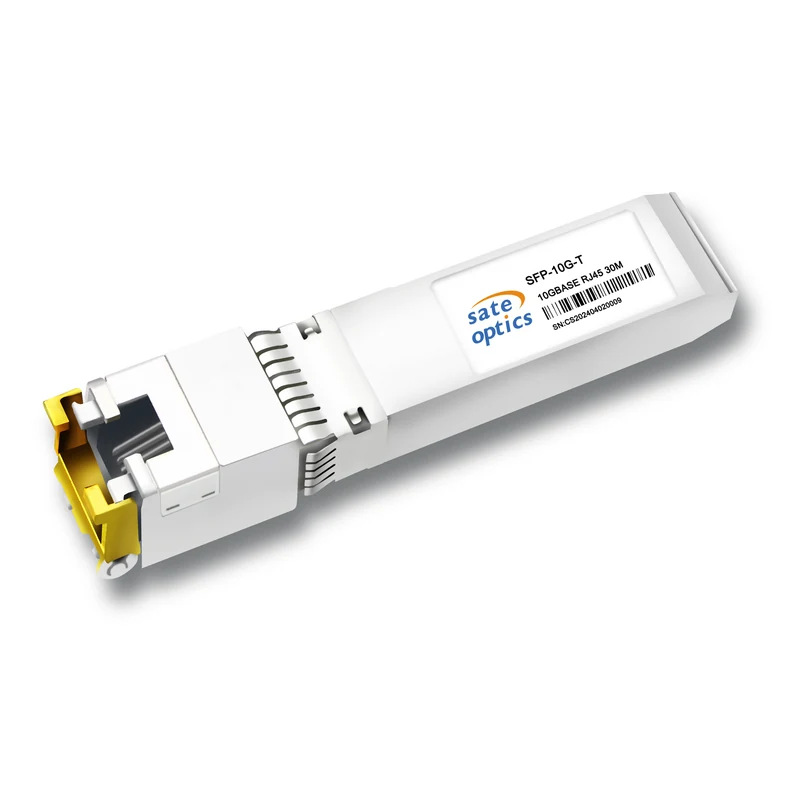
A 10G SFP+ port and a 10G RJ45 port look like the same thing on a switch — until you fill a row of them. A fibre SFP+ sips under a watt. A 10GBASE-T copper module carries a full Ethernet PHY inside the SFP+ shell, doing echo cancellation and equalisation on four twisted pairs, and it turns most of its power into heat inside the cage. That is not a defect. It is the price of putting 10G on copper, and it decides which reach to buy, how many ports you can fill, and when copper stops being the right answer.
This guide covers the three reaches Sate sells — 30m, 80m and 100m — how their power and heat compare, and the point where fibre is cheaper than cooling.
Why a Copper Module Runs Hot
A fibre optic converts electricity to light and back. A 10GBASE-T module does something harder: it pushes 10Gbps down copper pairs that were never designed for it, at 800 MHz of signalling, while cancelling its own echo and the crosstalk from neighbouring pairs. That work is done by a digital signal processor, and the harder the cable, the harder the DSP works. Longer cable means more attenuation and more interference to cancel, so the module draws more power — and every watt it draws becomes heat in the switch.
The gap to fibre is large. A 10G SR optical module typically draws around 0.8–1W. A passive DAC cable draws about 0.1W. A 10GBASE-T module typically draws 2–5W per port depending on reach and PHY generation — roughly three times a fibre optic. Cisco's own SFP-10G-T-X is rated 2.5W maximum at 30m on 10G, dropping to 1.0W when it negotiates down to 1G or 100M. Newer PHYs do better: vendor datasheets for 100m-rated 10G-T modules quote around 1.6W at 30m rising to about 2.0–2.1W at 80–100m. The exact number depends on the PHY inside the module, which is why this article quotes industry-typical ranges rather than a single figure — Sate's own product pages do not publish a watt figure for these modules, so check the datasheet for the exact number on the model you buy.
Heat is the part people underestimate, because one module feels trivial. A 48-port switch fully loaded with 10G-T at 2.5W per port is 120W of heat from the optics alone, before the switch itself. As a rule of thumb, every watt of optics needs roughly another watt or two of cooling. That is why some switches restrict 10G-T modules to specific ports, or refuse them entirely on ports whose power budget is sized for fibre optics — the limit is the port's power class, not the connector.
The 30m / 80m / 100m Ladder
Sate's 10G-T line is built around three reaches, all IEEE 802.3an 10GBASE-T over Cat6a/Cat7, all 0~70℃ except the industrial version. The right one is the shortest that covers the measured cable run — not the longest you can afford.
| Model | Reach | Cable | Typical power at 10G* | Best for |
|---|---|---|---|---|
| ST-10G-SFP-T-30 | 30m | Cat6a / Cat7 | ~1.5–2.5W | Inside the rack row: server and storage links, top-of-rack copper |
| ST-10G-SFP-T-80 | 80m | Cat6a / Cat7 | ~2.0–2.5W | Building distribution: floor-to-closet runs on installed structured cabling |
| ST-10G-SFP-T-100 | 100m | Cat6a / Cat7 | ~2.1–2.5W | Full-length structured runs: the longest copper reach without fibre |
| ST-10G-SFP-T-30I | 30m | Cat6a / Cat7 | ~1.5–2.5W | Same as T-30, rated −40~85℃ for outdoor and industrial cabinets |
| ST-10G-SFP-T-M30 | 30m | Cat6a / Cat7 | ~1.5–2.5W | Mixed-speed estates: auto-negotiates 10G / 1G / 100M / 10M for legacy copper gear |
* Typical industry figures from vendor datasheets (see above), not Sate specifications. Power rises with cable length because the DSP works harder on a longer, lossier run — a 30m module on a 5m patch cord draws less than the same module at its full 30m.
Two practical consequences follow from that table. First, buying the 100m module "to be safe" on a 20m run costs you nothing in reach but buys you a module whose DSP is built for the longest, hardest case — if the 30m module covers the run, it is the cooler and usually cheaper choice. Second, the industrial T-30I is not a longer-reach module; it is the same 30m reach with a wider temperature rating, for cabinets where the air itself is hot.
Four Checks Before You Fill a Switch With Copper
| Check | What to do |
|---|---|
| Port power budget | Confirm the switch model supports 10GBASE-T SFP+ on the ports you plan to use, and how many at once. Some switches cap the count or restrict copper modules to specific ports — find out before ordering 48 of them. |
| Measure the run | Buy the reach that covers the measured cable length with margin, not the longest available. A 30m module on an 80m run will flap or fail; a 100m module on a 20m run is wasted headroom. |
| Cable grade | Cat6a or Cat7 for 10G at any of these reaches. Plain Cat6 tops out well short of 100m (around 50–55m), and Cat5e is a 1G cable — it will not carry 10G reliably at any distance. |
| Airflow and neighbours | Leave airflow around copper modules, especially in the top row of a dense switch. A cage full of 2.5W modules heats its neighbours; if the switch reports rising transceiver temperatures, spread the copper ports or move some links to fibre. |
When to Switch to Fibre Instead
Copper wins where the cable is already in the walls and the endpoints are RJ45. It loses on three counts, and any one of them is a reason to buy fibre:
Density. A top-of-rack switch with 48 copper ports is 120W of optics heat in one rack unit. The same 48 ports on SR fibre is under 50W. If the switch is already thermally tight, fibre is not an upgrade — it is the only way to fill the ports.
Distance. Past 100m, 10GBASE-T is finished — there is no longer-reach copper module. A 10G SR optic reaches 300m on OM3 multimode, and LR reaches 10km on single-mode, at about a watt each.
Hot environments. In a cabinet that already runs warm, every copper module adds heat to air that cannot take it. The industrial T-30I tolerates the temperature, but it does not reduce it — fibre removes the heat source instead.
The honest comparison is not copper versus fibre in general. It is copper for short, installed, RJ45-terminated runs — and fibre for everything dense, long, or hot. Most real networks use both, and the 10G-T module exists so the copper part of the network does not need a different switch.
Four Mistakes That Cook a Switch
- Buying the 100m module for every run. Reach is not headroom. Match the module to the measured distance; the shortest reach that covers the run is the coolest one.
- Ignoring the switch's supported-transceiver list. A port that takes a fibre SFP+ does not automatically take a 10G-T module at full power. Check the platform's power budget first — a module the switch refuses is worse than a module you did not buy.
- Running 10G over Cat5e or Cat6 and blaming the module. If the link negotiates down or flaps, the cable is usually the cause. The module cannot fix a cable that was never rated for 10G at that distance. Link-instability symptoms and how to chase them are covered in our 10G RJ45 troubleshooting guide.
- Packing copper modules into a hot, unventilated cabinet. Heat is cumulative and the top row of a dense switch is the hottest place in it. If temperatures climb, spread the copper across ports, leave gaps, or move the longest runs to fibre.
Before You Order
Every Sate Optics 10G-T copper module is coded for major networking platforms — including Cisco, Juniper, Arista, Huawei, Nokia, H3C and ZTE — and 100% tested before shipment, and every one is covered by a 3-year warranty with lifetime maintenance. The newest of the line is the ST-10G-SFP-T-100: the full 100m reach over Cat6a/Cat7 for structured runs that the 30m and 80m modules cannot cover.
If you are planning a copper rollout, send us the switch model, how many copper ports you need, and the longest measured cable run. We will confirm which reach fits, whether the switch's port budget allows that many copper modules, and where fibre would serve you better — before you order.
Need Help Choosing the Right Module?
Tell us your switch model and the distance you need to cover — we confirm compatibility and reply within 24 hours.
Get a Quote Chat on WhatsAppPrevious:Why Long-Reach ER/ZR Optics Need a Fixed Attenuator on Short Fiber: Receiver Overload Explained
Next:No More