
2026-09-17 22:31:12
What Happens When TX and RX Are Reversed? A Simple Guide to Optical Link Troubleshooting
You install two optical transceivers, connect the fiber, and expect the link to come up.
But the switch still shows:
LINK DOWN.
Before replacing the SFP, SFP+, SFP28, or fiber cable, there is one simple question worth checking:
Are TX and RX connected correctly?
For a conventional duplex optical link, the basic rule is simple:
TX → RX
RX ← TX
If TX is connected to TX and RX is connected to RX, the optical signal may not reach the receiver correctly, and the link can remain down.
This is one of the simplest optical networking problems to fix—and one of the easiest to overlook.
What Do TX and RX Mean?
TX means Transmit.
It is the optical path that sends data from the transceiver.
RX means Receive.
It is the optical path that receives optical data from the remote transceiver.
In a conventional duplex fiber connection, both directions are required:
Switch A                         Switch B

TX  ─────────────────────────→  RX
RX  ←─────────────────────────  TX
The important point is:
The TX side of one transceiver must connect to the RX side of the transceiver at the other end.
Cisco's fiber troubleshooting guidance specifically recommends checking whether TX and RX fibers have been reversed when no optical power is detected; its Catalyst documentation likewise notes that duplex links require the sender to connect to the receiver at the opposite end.
What Happens When TX and RX Are Reversed?
Consider this incorrect connection:
Switch A                         Switch B

TX  ─────────────────────────→  TX
RX  ←─────────────────────────  RX

                 LINK DOWN
The transceivers may be correctly installed.
The switches may be powered normally.
The fiber may look perfectly fine.
But the optical paths are not correctly paired.
Typical symptoms can include:
Link remains down
No traffic passes between the devices
RX optical power is absent or unexpectedly low
LOS or similar optical alarms may appear
One side may show TX activity while the remote side does not receive the expected signal
Engineers may incorrectly suspect a defective transceiver
A reversed fiber connection does not automatically mean the optical module is faulty.
This is why checking the complete optical path before replacing the module can save troubleshooting time and unnecessary replacement costs. Sate Optics also recommends checking compatibility, fiber, distance, optical power, and other link conditions rather than assuming that an unstable link is caused by the transceiver itself.
Duplex Fiber: The Basic TX/RX Rule
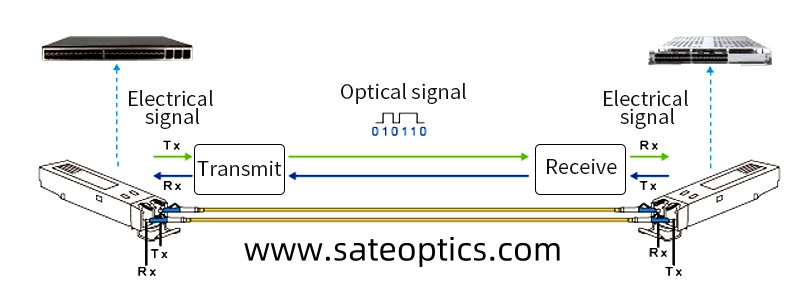
Most conventional duplex SFP and SFP+ optical links use two optical paths.
One fiber carries the transmit signal in one direction.
The other fiber carries the receive signal in the opposite direction.
A simple connection looks like this:
        Fiber 1
TX  ───────────────→  RX

        Fiber 2
RX  ←───────────────  TX
The fiber pair therefore has a polarity.
If the two fibers are crossed correctly, the link works:
A-TX → B-RX
A-RX ← B-TX
If they are connected incorrectly:
A-TX → B-TX
A-RX ← B-RX
the link may remain down.
This becomes particularly important during installation, patch-panel work, maintenance, or when replacing fiber patch cords.
A simple rule to remember
Duplex optical link = TX connects to RX.
It sounds obvious, but when many fiber connections are installed in a rack, it is surprisingly easy to reverse the pair.
Is TX/RX Polarity the Same as Wavelength Matching?
No.
They are related troubleshooting checks, but they are different issues.
TX/RX polarity
This describes which physical optical path connects to which port.
For a conventional duplex link:
TX → RX
Wavelength matching
This describes whether the transceiver at one end transmits at a wavelength that the other end is designed to receive.
For example, a conventional 10G LR link commonly uses 1310nm optics over single-mode fiber, while SR applications commonly use 850nm optics over multimode fiber. The exact specifications depend on the transceiver standard.
So when troubleshooting a link, do not stop after checking the fiber polarity.
Also verify:
Wavelength → Fiber Type → Distance → Transceiver Compatibility
What About BiDi SFPs?
This is where the troubleshooting process becomes different.
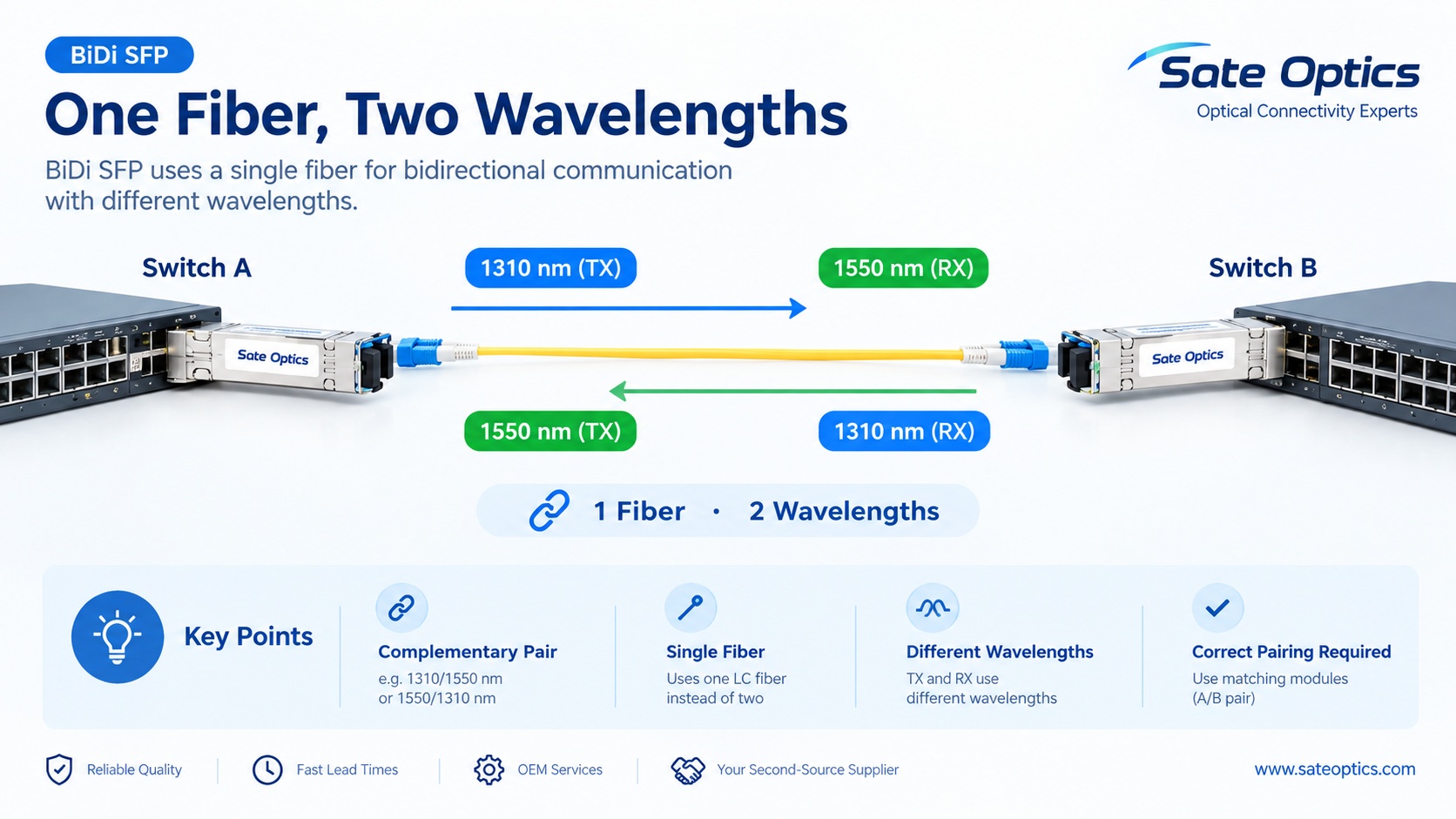
A BiDi optical transceiver uses a single fiber for bidirectional communication.
Instead of using two separate fibers for TX and RX, the module uses different optical wavelengths for the two directions.
For example:
BiDi A                         BiDi B

1310nm TX ─────────────────→  1550nm RX

1550nm RX ←─────────────────  1310nm TX
In this type of application:
1 Fiber + 2 Wavelengths = Bidirectional Communication
BiDi modules therefore must be used as a complementary pair.
For example:
Module A: 1310nm TX / 1550nm RX
Module B: 1550nm TX / 1310nm RX
The exact wavelength pair depends on the specific BiDi design. Sate Optics offers BiDi configurations using combinations such as 1310/1550nm, 1310/1490nm, and other wavelength pairs across different speeds and distances.
Important BiDi warning
You should not treat two random BiDi modules as interchangeable.
For example:
1310 TX / 1550 RX
should normally be paired with the complementary:
1550 TX / 1310 RX
configuration.
If the wavelength directions do not complement each other, the receiving side may not detect the expected optical signal.
So for BiDi:
Check the TX/RX wavelength pair, not just the module's speed and distance.
Duplex SFP vs BiDi SFP
| Feature | Duplex SFP | BiDi SFP |
|---|---|---|
| Fiber | 2 fibers | 1 fiber |
| Connector | Commonly Duplex LC | Commonly Simplex LC |
| TX/RX | Separate optical paths | Bidirectional over one fiber |
| Wavelength | Usually same nominal wavelength at both ends | Complementary TX/RX wavelengths |
| Polarity check | TX → RX | Wavelength pair must be complementary |
| Typical use | Standard fiber links | Fiber-saving / existing single-fiber deployments |
Sate Optics' current 1G and 10G BiDi portfolios include Simplex LC, single-mode configurations with complementary wavelength pairs and multiple reach options.
5 Checks to Perform Before Replacing the SFP
If an optical link stays down, use this order:
1. Check TX/RX Polarity
For a duplex link:
TX → RX
RX → TX
Check both ends, not just the switch side.
If a patch cord has been moved or replaced, verify the fiber pair again.
2. Check the Fiber Type
Confirm whether the transceiver requires:
Multimode fiber
Single-mode fiber
Duplex fiber
Simplex fiber
A specific connector configuration
For example, 10G SR and 25G SR are commonly associated with multimode fiber, while many LR and BiDi applications use single-mode fiber.
Using the wrong fiber type can create a link problem even when TX and RX polarity are correct.
3. Check Wavelength
Verify the optical wavelength at both ends.
For conventional duplex optics, make sure the two modules are designed to communicate with each other.
For BiDi optics, check that the wavelength directions are complementary.
For example:
1310 TX / 1550 RX ↔ 1550 TX / 1310 RX
Do not assume that two modules with the same speed and distance are automatically compatible.
4. Check Distance
Compare the actual fiber distance with the transceiver's specified reach.
A 10G SR, 10G LR, 25G LR, or BiDi module can have very different reach and fiber requirements.
Sate Optics' current product portfolio, for example, includes 1G BiDi configurations from short-reach options through 20km, 40km, 80km and longer-distance configurations, while 10G BiDi options include 10km, 20km and 40km variants.
5. Check Transceiver Compatibility
Finally, verify that the optical module is supported by the switch, router, server, NIC, or other host equipment.
Check:
Device model
Port type
Data rate
Transceiver form factor
Coding / compatibility requirements
Wavelength
Fiber type
Connector
Transmission distance
DOM/DDM information, where available
A module with the correct optical specifications can still require compatibility verification with the host platform.
Common SFP and Optical Transceiver Models to Check
When troubleshooting or replacing an optical module, engineers may encounter model references such as:
1G SFP
GLC-SX-MMD
GLC-LH-SMD
GLC-ZX-SMD
1G SFP SX
1G SFP LX
1G SFP ZX
1G BiDi SFP
Sate Optics currently offers compatible 1G SFP solutions including SX, LX, EX, ZX and BiDi configurations. Its 1G BiDi portfolio includes models such as ST-1G-SFP-BD35-20 and ST-1G-SFP-BD53-20, using complementary 1310/1550nm configurations over single-mode fiber.
10G SFP+
Common model keywords include:
SFP-10G-SR
SFP-10G-LR
SFP-10G-ER
10G SFP+ SR
10G SFP+ LR
10G BiDi SFP+
Sate Optics' 10G BiDi portfolio includes ST-10G-SFP-BD23-20 and ST-10G-SFP-BD32-20, which use complementary 1270/1330nm TX/RX configurations over Simplex LC single-mode fiber for 20km applications.
25G SFP28
Common model keywords include:
SFP-25G-SR-S
SFP-25G-LR-S
25G SFP28 SR
25G SFP28 LR
25G SFP28 BiDi
Sate Optics also offers 25G SFP28 BiDi configurations, including complementary 1270/1330nm options in Simplex LC and single-mode fiber.
100G QSFP28
For higher-speed applications, common model families include:
QSFP-100G-SR4-S
QSFP-100G-LR4-S
QSFP-100G-ER4
100G QSFP28 SR4
100G QSFP28 LR4
100G QSFP28 BiDi
Sate Optics' current portfolio also includes 100G QSFP28 BiDi configurations using Simplex LC and complementary wavelength directions.
These model names should be treated as specific optical solutions, not interchangeable modules. The actual switch model, port, fiber, distance, wavelength and compatibility requirements should always be verified before ordering.
Where Does TX/RX Polarity Matter Most?
Data Center Switch-to-Switch Links
In a data center, many optical links may be installed between:
Leaf → Spine
Switch → Switch
Server → Switch
A single reversed duplex fiber pair can leave a link down even though the transceivers and switches are functioning normally.
Enterprise Network Uplinks
Enterprise networks often use 1G SFP or 10G SFP+ uplinks between access, distribution, and core switches.
During maintenance, fiber patch cords can be moved between ports, making polarity checks particularly useful when a previously working link suddenly stops coming up.
Long-Distance Fiber Links
For longer links, polarity is only one part of the troubleshooting process.
Engineers should also check:
TX/RX → Wavelength → Fiber → Distance → Optical Power → Compatibility
Sate Optics notes that TX power, RX sensitivity, and optical power budget are important when evaluating whether a transceiver and fiber link can support the required distance.
BiDi Fiber Deployments
BiDi can be useful when only one fiber is available or when reducing fiber usage is an important consideration.
But because BiDi depends on complementary wavelength directions, correct module pairing becomes especially important.
A Simple Troubleshooting Checklist
When a new optical link does not come up, save this checklist:
LINK DOWN?
☐ TX → RX polarity
☐ Fiber type
☐ Connector type
☐ Wavelength
☐ Transmission distance
☐ Optical power / RX level
☐ Switch or device compatibility
☐ DOM/DDM readings, if available
☐ Clean and properly seated fiber connectors
The key lesson is simple:
Do not replace the optical transceiver before checking the optical path.
A link problem can come from the transceiver, but it can also come from the fiber, polarity, wavelength, distance, optical power, or host compatibility.
FAQ
What happens if TX is connected to TX?
On a conventional duplex optical link, connecting TX to TX and RX to RX reverses the optical paths. The link may remain down because each transceiver's transmitted signal is not reaching the remote receiver correctly.
How do I fix reversed TX and RX?
For a standard duplex fiber connection, swap the fiber pair so that:
TX → RX
and
RX → TX
Then check whether the optical link establishes.
Can reversed TX/RX damage an SFP?
A simple TX/RX polarity reversal normally results in a failed link rather than automatically meaning the SFP has been damaged. However, optical equipment should always be installed and operated according to the applicable manufacturer documentation.
Does BiDi SFP use TX and RX?
Yes, but BiDi handles TX and RX differently from conventional duplex optics. Both directions travel through one fiber using different wavelengths.
For example:
1310nm TX / 1550nm RX
can be paired with:
1550nm TX / 1310nm RX
The exact wavelengths depend on the BiDi model.
Can I use two identical BiDi SFPs?
Not necessarily.
BiDi modules generally need complementary TX/RX wavelength configurations. Two identical modules with the same TX/RX wavelength direction may not provide the required optical pairing.
Does fiber polarity matter for SFP+?
Yes.
For a conventional duplex SFP+ link, the transmit path must connect to the receive path at the remote end.
Does TX/RX polarity matter for SFP28?
Yes. The same basic duplex principle applies when using conventional duplex SFP28 optical modules:
Local TX → Remote RX
Local RX ← Remote TX
However, the exact fiber type, connector, wavelength, reach and host compatibility must also match the selected SFP28 transceiver.
What should I check first when an SFP link is down?
Start with the physical optical path:
TX/RX polarity → Fiber → Wavelength → Distance → Compatibility
Then check optical power and DOM/DDM information where available.
Can compatible SFP modules be used with different switch brands?
Compatible optics can be used in many mixed-vendor networking environments, but compatibility should be verified against the specific host device and port.
Do not assume that a module will work simply because the speed and connector are the same.
Choosing the Right Optical Transceiver
The correct optical transceiver is not determined by speed alone.
Before selecting an SFP, SFP+, SFP28, QSFP28 or BiDi module, confirm:
Device → Port → Speed → Fiber → Connector → Wavelength → Distance → Compatibility
For BiDi applications, add one more critical check:
TX/RX wavelength pairing
This simple approach can prevent many common installation and troubleshooting problems.
Sate Optics Compatible Optical Transceiver Solutions
Sate Optics provides compatible optical transceivers for enterprise networks, data centers, telecom, industrial Ethernet and other fiber connectivity applications.
The portfolio includes:
1G SFP
10G SFP+
25G SFP28
40G QSFP+
100G QSFP28
400G QSFP-DD
800G optical transceivers
BiDi optical modules
CWDM / DWDM solutions
DAC / AOC and fiber connectivity products
For compatible optics, the most useful information to provide when requesting a quotation is:
Switch / router model + port type + network speed + fiber type + connector + distance + required optical module
This allows the transceiver to be matched to the actual network rather than selected only by a model name.
Explore Sate Optics 1G SFP Transceivers
Explore Sate Optics 10G SFP+ Transceivers
Explore Sate Optics 25G SFP28 Transceivers
Explore Sate Optics 100G QSFP28 Transceivers
Need help matching an optical module?
Send us the switch or router model, port type, required speed, fiber type, connector and transmission distance.
Sate Optics can help identify a compatible optical transceiver based on the actual network requirements.
Don't replace the SFP too quickly. Check the optical path first.
Sate Optics | Optical Connectivity Experts
Previous:AI Data Center Networking: 400G & 800G Optical Transceivers