
Which Fiber Cable Should You Use with Your SFP? A Simple Guide to SX, LX, SR, LR and QSFP SR4
2026-07-16 15:09:25
Which Fiber Cable Should You Use with Your SFP?
Buying the correct SFP module is only half of the job.
The other half—and often the part that causes the most troubleshooting—is choosing the right fiber cable.
Every week, network engineers encounter issues such as:
The link LED never turns on.
Both transceivers are recognized, but there's no communication.
Optical power looks abnormal.
The distance should work, but the connection remains unstable.
In many cases, the SFP module is working perfectly.
The real problem is using the wrong fiber type.
This guide explains which fiber cable should be paired with the most common optical transceivers, helping you avoid unnecessary downtime and replacement costs.
Quick Compatibility Guide
1. SX Transceivers
Recommended Fiber
OM1 (62.5/125 μm)
OM2 (50/125 μm)
Connector
LC Duplex
Typical Wavelength
850nm
Common Models
1000BASE-SX SFP
Cisco GLC-SX-MMD Compatible
HPE J4858C Compatible
Typical Applications
Enterprise LAN
Office buildings
Campus networks
Legacy multimode cabling
SX modules are designed for short-distance transmission over multimode fiber and are commonly found in Gigabit Ethernet networks.
2. LX Transceivers
Recommended Fiber
OS2 Single Mode Fiber (9/125 μm)
Connector
LC Duplex
Typical Wavelength
1310nm
Common Models
1000BASE-LX SFP
Cisco GLC-LH-SMD Compatible
Juniper EX-SFP-1GE-LX Compatible
Typical Applications
Campus backbone
Building-to-building links
Metropolitan access networks
LX modules provide much longer transmission distances than SX modules and are the preferred choice for single-mode deployments.
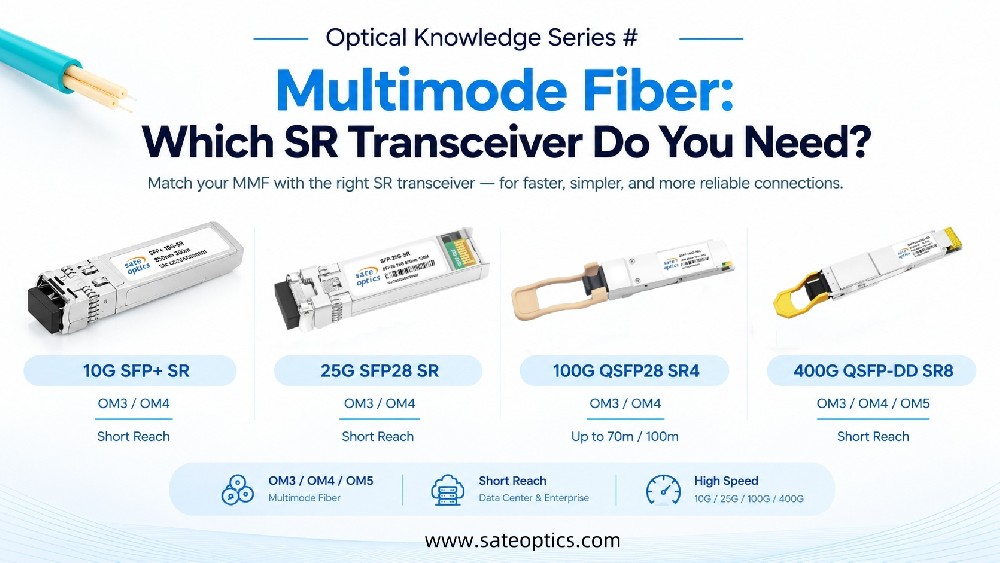
3. 10G SFP+ SR
Recommended Fiber
OM3
OM4
OM5
Connector
LC Duplex
Typical Wavelength
850nm
Common Models
Cisco SFP-10G-SR
HPE J9150D Compatible
Dell 407-BBOU Compatible
Typical Applications
Data centers
Server racks
Top-of-Rack (ToR) switching
High-speed enterprise networks
SR modules are optimized for high-speed short-distance communication over multimode fiber.
4. 10G SFP+ LR
Recommended Fiber
OS2 Single Mode Fiber
Connector
LC Duplex
Typical Wavelength
1310nm
Common Models
Cisco SFP-10G-LR
Juniper EX-SFP-10GE-LR
Arista SFP-10G-LR Compatible
Typical Applications
Campus backbone
Enterprise core networks
ISP aggregation
Long-distance building connections
LR modules remain one of the most popular choices for 10G deployments because they provide stable transmission up to 10 km over single-mode fiber.
5. 40G/100G QSFP SR4
Recommended Fiber
OM3 MPO Fiber
OM4 MPO Fiber
Connector
MPO/MTP
Typical Models
QSFP-40G-SR4
QSFP-100G-SR4
QSFP28 SR4
Typical Applications
Spine-Leaf architectures
Cloud data centers
AI clusters
High-density switching
Unlike traditional SFP modules, QSFP SR4 uses parallel optics and requires MPO/MTP cabling rather than LC duplex fiber.
Common Fiber Selection Mistakes
Even experienced engineers occasionally make these mistakes.
Using LR modules with multimode fiber
Although mode-conditioning cables exist, standard LR modules are designed for single-mode fiber. Using multimode fiber may reduce performance or prevent the link from working properly.
Connecting SR modules to single-mode fiber
SR optics are designed specifically for multimode fiber. Connecting them directly to single-mode fiber is not recommended and may result in unstable or failed links.
Forgetting MPO requirements for QSFP SR4
Many first-time users assume every optical module uses LC connectors.
However, QSFP SR4 modules require MPO/MTP fiber because they transmit multiple optical lanes simultaneously.
Mixing different fiber types
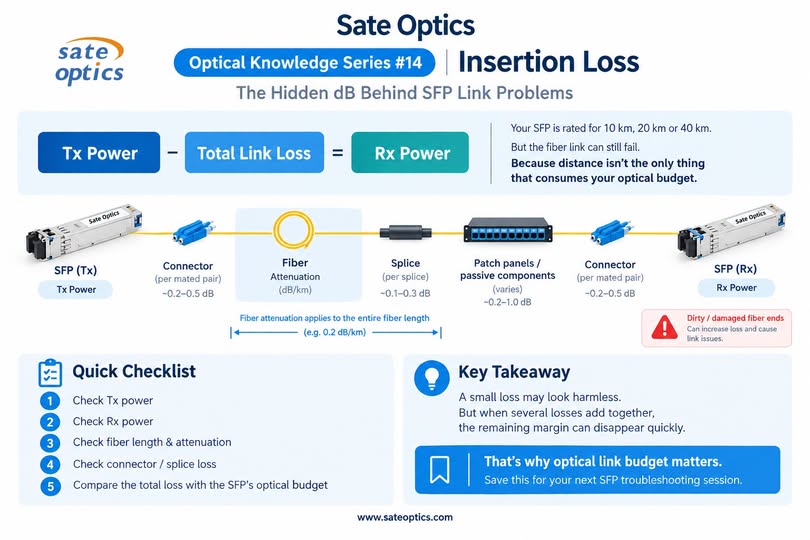
Combining different fiber types or using old patch cords with new infrastructure may introduce excessive insertion loss and unexpected link failures.
Choosing the Right Fiber Is Just as Important as Choosing the Right Module
When selecting an optical transceiver, always verify these four items:
✔ Module type (SX, LX, SR, LR, SR4)
✔ Fiber type (Single Mode or Multimode)
✔ Connector type (LC or MPO)
✔ Required transmission distance
A few minutes of verification before deployment can save hours of troubleshooting later.
Typical Deployment Scenarios
| Network Scenario | Recommended Module | Recommended Fiber |
|---|---|---|
| Office LAN | 1000BASE-SX | OM2 Multimode |
| Campus Network | 1000BASE-LX | OS2 Single Mode |
| Data Center Rack | 10G SFP+ SR | OM3 / OM4 |
| Enterprise Backbone | 10G SFP+ LR | OS2 Single Mode |
| Spine-Leaf Data Center | QSFP28 SR4 | OM3 MPO |
| AI Computing Cluster | 100G QSFP28 SR4 | OM4 MPO |
FAQ
Can I use an SX module with single-mode fiber?
No. SX modules are designed for multimode fiber. For single-mode applications, choose an LX module instead.
Can LR modules work over multimode fiber?
In most deployments, no. LR optics are intended for OS2 single-mode fiber. If multimode fiber is already installed, an SR module is usually the better choice.
Why doesn't my QSFP SR4 module have LC connectors?
QSFP SR4 uses four parallel transmit and four parallel receive lanes, requiring MPO/MTP connectors instead of standard LC duplex connectors.
What's the difference between OM3 and OS2 fiber?
OM3 is multimode fiber for short-distance, high-speed links such as data centers. OS2 is single-mode fiber designed for longer transmission distances, including campus and metropolitan networks.
How do I know which SFP module I need?
Consider four key factors:
Required speed (1G, 10G, 25G, 100G)
Transmission distance
Existing fiber type
Switch compatibility
Selecting all four correctly ensures reliable network performance.
Conclusion
Choosing the correct fiber cable is essential for achieving stable, high-performance optical links.
Whether you're deploying Gigabit Ethernet in an office, upgrading a 10G enterprise backbone, or building a 100G data center, matching the right transceiver with the appropriate fiber type helps reduce installation issues, improve reliability, and lower long-term maintenance costs.
Understanding the differences between SX, LX, SR, LR, and QSFP SR4 is a simple step that can prevent costly compatibility mistakes.
Need Help Choosing the Right Optical Transceiver?
At Sate Optics, we supply a full range of compatible optical transceivers, including:
DAC, AOC, and MPO fiber cabling solutions
Every module is coded and tested for compatibility with major networking brands, including Cisco, Juniper, HPE, Aruba, Dell, Huawei, Nokia, Arista, MikroTik, Fortinet, and more.
Not sure which module or fiber cable fits your network? Contact the Sate Optics team for compatibility recommendations, product selection, and fast global delivery.
Previous:The Future of 400G in Data Centers | Choosing the Right 400G Optical Transceiver
Next:Link Flapping? How to Troubleshoot SFP, SFP+, QSFP+ and QSFP28 Transceiver Issues Before Replacement