
Optical Links: What Specs Don’t Tell You About SFP Modules
2026-04-11 15:43:07
Optical Links: What Specs Don’t Tell You About SFP Modules
When it comes to choosing the right SFP (Small Form-factor Pluggable) module for your network, most professionals rely heavily on datasheets. Specs like speed, distance, and wavelength are the go-to indicators. However, in real-world applications, relying solely on these numbers can be misleading. The truth is, optical link performance often depends on factors that datasheets don’t cover.
⚠️ What the Specs DON’T Tell You
1️⃣ “10km” Doesn’t Mean Your 10km
Datasheets typically state that a module can reach a certain distance, such as 10km. But what’s missing? These figures assume ideal conditions:
Perfect fiber quality
Clean, well-maintained connectors
A controlled, optimal environment
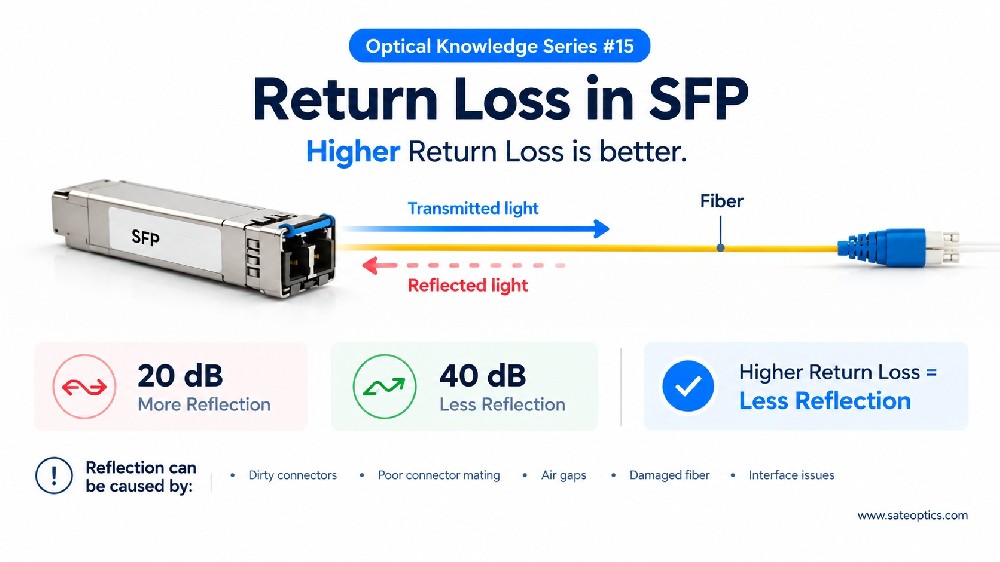
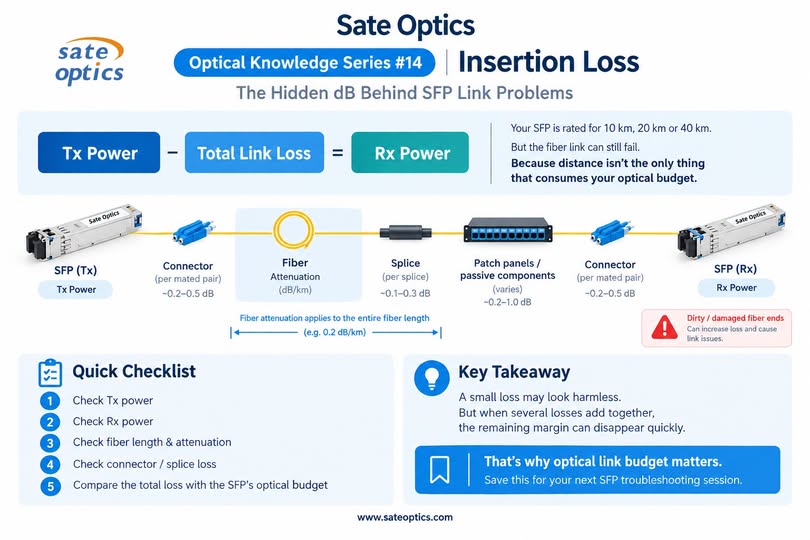
In practice, even minor imperfections, like dirty connectors or aged patch cables, can cut the link’s distance in half. It's crucial to remember that "10km" is an idealized figure — not a guarantee in the real world.
2️⃣ Rx Power Matters More Than Distance
Two links might both be rated for 10km, but their performance can vary significantly. Why?
👉 Rx power drift over time is one of the leading causes of instability, often the first sign that a link is beginning to fail.
While distance is commonly monitored, many teams overlook Rx power trends, which can directly impact link stability. Monitoring this factor over time can prevent unexpected drops and packet loss.
3️⃣ Not All SFPs Behave the Same Under Stress
On paper, two modules may look identical. But under real-world stress, they can perform very differently. Factors like:
Temperature stability
DOM (Digital Optical Monitoring) accuracy
Error tolerance
These differences can significantly affect link reliability. When you’re evaluating SFPs, it’s important to consider how they’ll perform under varying environmental conditions, rather than just relying on datasheet numbers.
4️⃣ Compatibility Isn’t Just a Checkbox
Many SFP modules claim to be “compatible” with major brands like Cisco, Huawei, or MikroTik. But compatibility goes beyond just fitting into the port.
EEPROM tuning
Firmware behavior
Switch tolerance
These factors are often the true culprits behind link instability. Ensuring compatibility involves more than just plugging in a module. The module’s firmware and its interaction with the switch can make or break the stability of your link.
5️⃣ Cleanliness is Crucial
One of the most common and often overlooked causes of optical link failure is contamination. Oil, dust, and even microscopic particles on the connectors can lead to:
Lower Rx power
Higher Bit Error Rates (BER)
Random link drops
These issues are often invisible to the naked eye. Without regular connector inspection and cleaning, you may be unknowingly compromising your link’s performance.
🔍 How to Evaluate an SFP Link in the Real World
Instead of asking the simple question, “Is this module rated for 10km?” consider these more practical questions:
What is the actual Rx power range on site?
How stable is the Rx power over time?
Are connectors regularly inspected and cleaned?
Has the module been tested under temperature variations?
How does the module perform after extended uptime?
💡 The Bottom Line
In most networks, the biggest challenges aren’t the distance limits of optical links. Instead, issues are often caused by:
Power margin erosion over time
Physical layer contamination (e.g., dirty connectors)
Real-world variability that datasheets can’t predict
For industries like data centers, ISPs, structured cabling, and enterprise IT, it’s worth asking: What’s the invisible factor that caused your last optical failure? Chances are, it wasn’t the distance.
🛠️ Troubleshooting Tips
Next time a “perfect spec” link fails, remember these invisible factors. By focusing on the full picture — not just the numbers — you can significantly improve the reliability and stability of your optical links.
Previous:SFP vs SFP+ vs SFP28 vs QSFP+ vs QSFP28 — What’s the Difference?
Next:CWDM or DWDM: Which One Should You Choose for Your Network?