
2026-04-04 15:01:50
Fiber Link Down? 7 Essential Troubleshooting Steps for Network Engineers
When a fiber optic link goes down, the instinct is often to replace cables or reboot devices. However, most issues are caused by simple, fixable problems. By following a structured troubleshooting process, you can quickly identify and resolve the issue.
This article provides 7 essential troubleshooting steps to help network engineers and telecom professionals resolve common fiber link issues efficiently. Whether you’re managing a data center or working in telecom infrastructure, this guide will help you restore network performance and reduce downtime.
1. Verify the Correct SFP Module Type
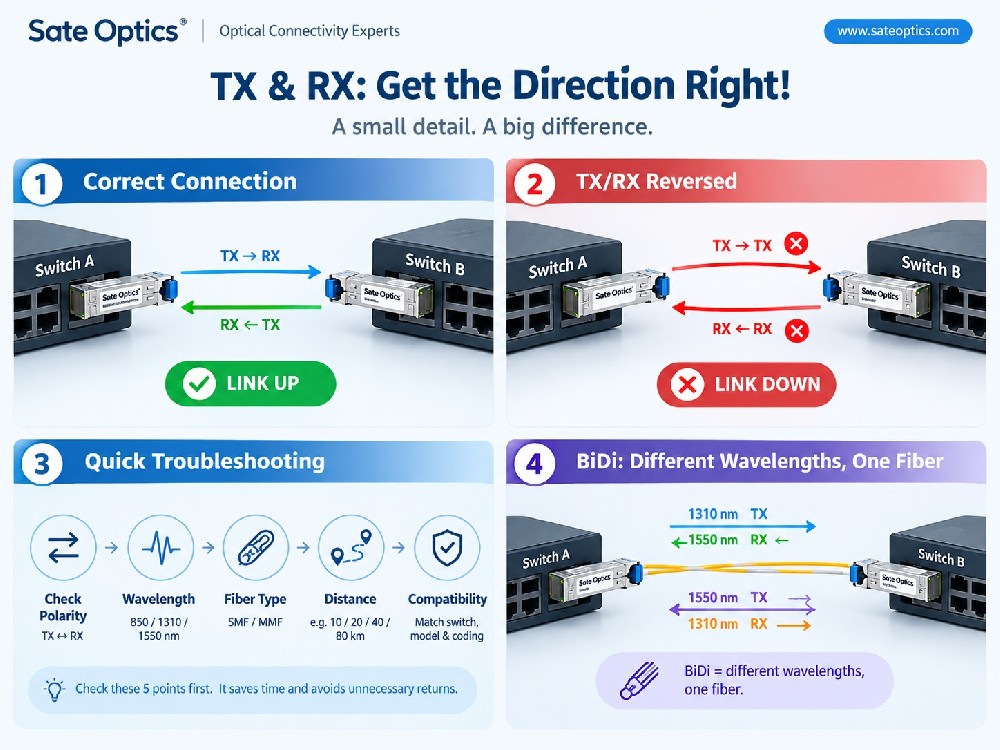
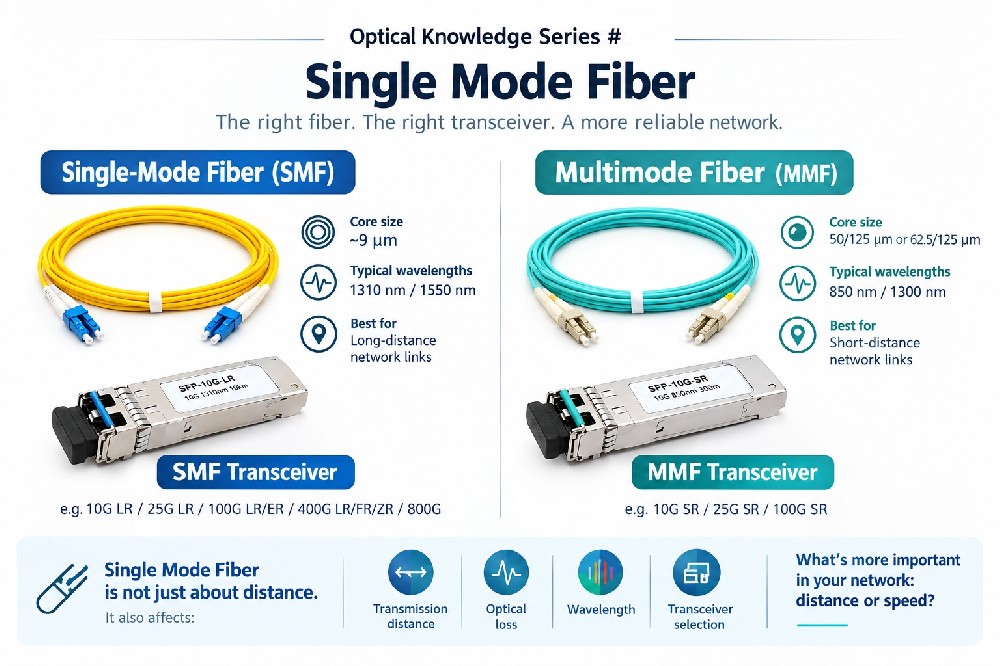
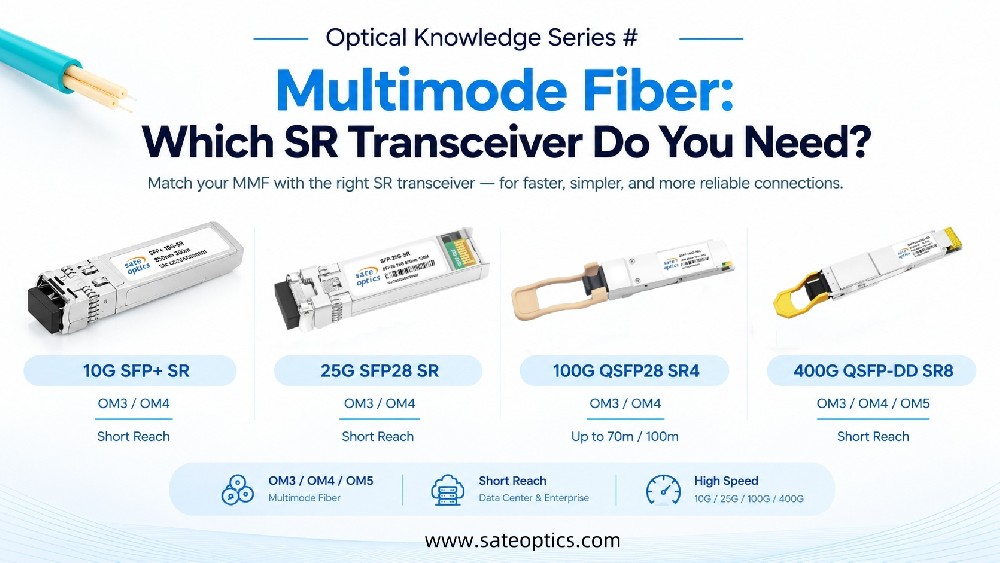
Ensure that the SFP modules on both ends of the fiber link are the correct type for your connection, such as SR, LR, ER, ZR, or BiDi. Using mismatched modules is one of the most common causes of link failure.
Why This Matters: Mismatched optics can prevent the link from establishing.
2. Check BiDi Wavelength Pairing
For BiDi (Bidirectional) optical transceivers, make sure that the wavelengths on both ends are paired correctly. For example, one side may use 1310nm and the other 1490nm. If both sides use the same wavelength, the link will not work.
Why This Matters: Correct wavelength pairing is critical for establishing a stable link.
3. Confirm Fiber Polarity and Patching
Ensure the correct polarity for fiber connections. Tx (Transmit) should be connected to Rx (Receive). Many link failures are caused by reversed fiber connections.
Why This Matters: Reversed polarity will block the signal, preventing the link from being established.
4. Clean Fiber Connectors
Dust or dirt on fiber connectors can lead to signal loss and degrade link performance. Always clean the connectors before continuing with troubleshooting.
Why This Matters: Dirty connectors cause significant optical power loss, leading to link instability.
5. Verify Optical Power and Distance Budget
Ensure that the optical power and distance budget match the specifications of the modules. For example, using a 10km optic on a 40km link will cause instability and failure.
Why This Matters: Using optics that don’t meet the required distance will result in poor performance or complete failure.
6. Ensure Compatibility and Correct Coding
Some switches require coded/compatible SFP modules. If the module isn’t properly coded, the port might remain inactive.
Why This Matters: Ensuring compatibility prevents port failure and ensures the correct operation of your network equipment.
7. Check Hardware Port for Faults
If none of the above steps resolve the issue, the problem may lie with the hardware port on your switch or network interface card (NIC).
Why This Matters: Though rare, hardware failures can occur, so check the port as the final step in troubleshooting.
Common Fiber Link Issues Recap
Here’s a quick summary of the most common causes of fiber link failures:
Wrong SFP Module Type: Ensure both ends use the correct optics.
BiDi Wavelength Mismatch: Verify that wavelengths are paired correctly.
Fiber Polarity Issues: Double-check Tx and Rx polarity.
Dirty Connectors: Clean fiber connectors to avoid signal loss.
By following this checklist, you can quickly identify and fix the root cause of most link failures.
Troubleshooting Tip: Start from Layer 1
Always begin troubleshooting at Layer 1 (the physical layer). Physical issues are the most common cause of link failures, and resolving these first prevents you from spending time on more complex configuration issues.
FAQ - Frequently Asked Questions
1. Why can’t I get my fiber link to work even with the correct SFP modules?
The issue may be related to wavelength mismatch, fiber polarity errors, or dirty connectors. Follow the troubleshooting steps above to check these common issues.
2. How do I ensure my SFP modules are compatible with my switch?
Refer to the compatibility list provided by the device manufacturer or contact your supplier to confirm that the modules are supported.
3. What issues can dirty fiber connectors cause?
Dirty connectors cause optical signal loss, which can degrade or completely prevent the fiber link from functioning. Always clean connectors before troubleshooting further.
4. Does a port failure mean the hardware is faulty?
Hardware failures are less common but can happen. If all other troubleshooting steps fail, check the port as a final step.
Conclusion:
By following the 7 essential troubleshooting steps outlined in this guide, you can resolve most fiber link issues quickly and efficiently. Whether you’re an enterprise network administrator, data center engineer, or telecom operator, these steps will help you restore connectivity, reduce downtime, and improve network reliability.
Need Help Troubleshooting Fiber Links?
If you’re still experiencing fiber link issues or need assistance with optical transceivers, SFP modules, or other network equipment, our team is ready to help. Contact us for customized solutions, expert advice, and fast service.
Request a Quote: sales@sateoptics.com
Get Expert Support: info@sateoptics.com
#FiberOptic #SFP #Networking #DataCenter #Telecom #NetworkTroubleshooting #OpticalTransceivers #NetworkEngineer #FiberLinkIssues #ITInfrastructure
Previous:GPON vs XG-PON vs XGS-PON: Key Differences and How to Choose the Right PON Technology
Next:SFP vs SFP+ vs SFP28 vs QSFP+ vs QSFP28 — What’s the Difference?